
In Part 1, we saw that each “file” stored inside the PCX Library file started with an 84-byte header. In this post we’ll look at the files stored inside the Paganitzu data file PAGA1.004 and see what they are. Here’s the format for the header again that begins each file’s data. I’ve colored it to distinguish the separate parts.
Use this link to see all the posts in this “Reverse Engineering Paganitzu” series.
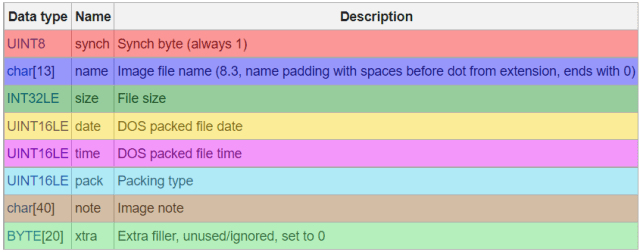
File Header
So, let’s jump straight into the hex editor and look at PAGA1.004 again. We’ll skip past the 122-byte main header for the PCX Library file and look at the next 84-bytes which should be the header for the first file.

The file header for the first file is 84 bytes from hex position 7A to CD. In red, there’s our “synch” byte, and it’s 01. That’s a good sign. Next are the 13 bytes (purple) that make the file name “P2APOEGA.PCC”. Hmmm… I was expecting (hoping for) a .PCX file. A bit of Googling and it turns out that .PCC files are actually .PCX files just with a different extension. No idea what the “P2APOEGA” filename means. It’s probably just the name the file had on the developer’s machine before he packed it (and maybe others) into this PAGA1.004 file. The “EGA” more than likely means that it contains EGA, or 16-color, graphics. “CGA” would mean 4-color graphics. CGA (Color Graphics Adapter, 4 colors), EGA (Extended Graphics Adapter, 16 colors), and VGA (Video Graphics Array, 256 colors) were three common standards for video cards during this era.
Ok, things are looking good! Next, we have a 4-byte number (dark green) for the size of the file. The number, in hex, is 00000835. 835 in hex is 2101 in decimal. After this 84-byte header will be 2101 bytes that are the contents of the P2APOEGA.PCC file. Following those 2101 bytes will either be the end of the file, or another 84-byte file header followed by that file’s bytes.
Date/Time Stamp
Next are two 2-byte numbers (yellow and pink) that represent the date and time of the file. There are actually 6 numbers packed into these two bytes, 3 for the year, month, and day, and 3 for the hour, minutes, and seconds. The date is 1637 in hex which is 0001011000110111 in binary. The time is 3E6D in hex which is 0011111001101101 in binary. According to https://moddingwiki.shikadi.net/wiki/PCX_Library, the date and time format is:

Looking at our bits, we have (the numbers on the bottom are in decimal):

According to that same page, you add 1980 to the year, and multiply the seconds by 2. This gives us a date/time stamp of 23-Jan-1991 07:51:26 am. That was the date/time stamp on the file P2APOEGA.PCC on the developer’s computer back in 1991 when he packed this file into PAGA1.004. That’s some cool little bit of history we’re excavated out of this file. Nice!
The Rest Of The Header
Next is a 2-byte number (light blue) called “Packing Type”. I couldn’t really find much information about this. To be completely honest, I’m writing this post probably a month after I figured these files out. I could swear I found some information about what this “Packing Type” was, but I can’t find anything about it now.
Next is 40 bytes of “Image note” (brown) and 20 bytes of “Extra filler” (light green), all of which seem to not be used and filled with random bytes (other than the “Image note” starting with a 00 indicating the end of the note as the first character).
The Actual File
The next 2101 bytes are the actual contents of the .PCX file. We’ll dig into that next time. I’m sure it will have its own header and format for the graphics data in it. We’ll figure all that out and take a look at the image stored inside it.
Conclusion
This PCX Library file is turning out to be a many-layered onion. It has a header, followed by one or more embedded file blocks. Each file block has its header followed by that file’s contents. Each file content represents a whole file complete with that file’s header and content. What a rabbit hole! We’re almost at the bottom of this one. Next time we dig into the PCX format (as opposed to the PCX Library format we’ve been digging into so far) and finally get to take a look at the graphics stored in the PCX files embedded in these PCX Library files. We’ll probably see images used in the game. Oh, the anticipation!


 Lee's Mind
I just compiled the code from here:
https://gist.github.com/hezi/c572f89beaed0cf11aca5f6403c43cc1
I ran the extractor, and out popped the large gfx files for Paganitzu. Fun stuff!
I had a blast researching this 2 years ago. My plan was to write a port of it for the TRS-80 Color Computer 3. At some point, I switched gears, and reverse engineered another MS-DOS game, Cloud Kingdoms, instead. I’m quite a way into making a clone of it for the TRS-80 Color Computer 3 (https://studio.youtube.com/video/WxmSOFYJwSA/edit). I might tackle Paganitzu next, after I finish Cloud Kingdoms.
That is a really nice looking game! I’ve been using MicroPython on an ESP32-S3 device (T-Display-S3 Pro), which has a 480×222 touchscreen display. I figure I can recreate some of the magic of these early MS-DOS games on something small and portable. I’ll have to make a demo video at some point.