
It’s been a bit since I posted last. Unfortunately, that seems to be normal for me. I’ve made quite a bit of progress since last time. I’ve figured out all the data files, written programs in C# for Windows that display the contents of them, and even wrote a 6309 Assembly program for the TRS-80 Color Computer that loads that map data and the tile data and draws a level. No moving around in the level or anything, but it draws the entire level (16×12 tiles with each tile being 16×16 pixels) with colors pretty close to those used in DOS on IBM Compatible PCs (specifically, default EGA 16-color palette).
Use this link to see all the posts in this “Reverse Engineering Paganitzu” series.
In this post, I want talk about the Font data in the data file PAGA1.003. I couldn’t find anything online about this file other than it contained “font data”. Fonts, as you may or may not know, are the data needed to draw text characters (like letters, number, symbols). In this case, they should be the data needed to draw the text characters on a graphics screen. They would be used in the game to draw menu options, and paragraphs of text used to explain the game. I was thinking it’s probably “binary” data describing small “tiles”, maybe 8 by 8 pixels, one tile for each character (probably upper- and lower-case letters, numbers, and some punctuation symbols. Time to open this file and look in it to see what’s there.
PAGA1.003 File – What’s In You?
I opened the PAGA1.003 file in a hex editor. A hex editor is a program that opens a file and shows the actual bytes that make up the file as hexadecimal (“hex” for short) numbers. These are numbers similar to the base-10 numbers we’re all used to, except hex numbers use 16 digits (0-9 and A-F) where our normal base-10 numbers use only 10 digits (0-9). Here’s what I saw:
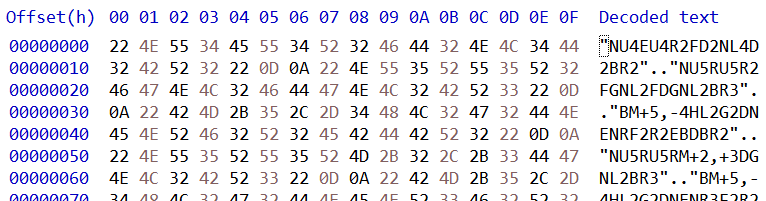
These are the first 128 bytes of the file. The main part shows the hex values of each byte in the file, 16 bytes per row. The section on the right with the header of “Decoded text” shows what those bytes would look like if they were displayed as ASCII text. Normally, for a “binary” file (like, say, one that contains numbers that represent pixel colors), I would expect to see a lot of “giberish” as decoded text, and probably a lot of “.” characters which represent characters that can’t be displayed (like 8 which is “backspace”, or 13 which is “carriage return”). That’s not what I saw for decoded text. I see a lot of normal displayable characters with periodic “..” (two periods). That looks suspiciously like lines of text with carriage return (decimal 13, hex 0D) and line feed (decimal 10, hex 0A) line breaks. Looking at the dot-dot’s in the hex numbers, sure enough I see “0D 0A” every place I see the dot-dots. This is a text file! Ok, close the hex editor and open it in a text editor (Notepad++, of course!).
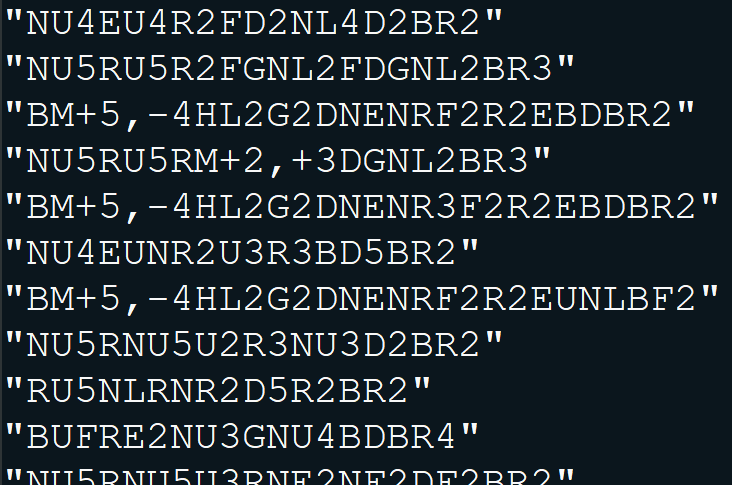
There are even quotation marks around all the lines of text. Why does this look vaguely familiar? It took me a while of staring at this and perplexing over it before it hit me.
Quick Basic – Draw Commands?
Paganitzu is compiled QuickBasic. QuickBasic had a “Draw” command you could give a string of “commands” to tell it to move a “pen” and draw on the screen. Some Googling found the syntax for the QuickBasic Draw command. Its commands where mainly a letter followed by an optional number; “D4” means draw down 4 pixels, and “H” means draw up and left 1 pixel (UDLR were the compass directions, EFGH where the diagonals). Commands could be prefixed with “N” to draw and then return to the start, or “B” to move the “pen” without drawing any pixels. Looking at the text in the PAGA1.003 file, that’s exactly what this looks like. The first one is “Draw up 4 pixels and return, up/right 1 pixel, up 4 pixels, right 2 pixels, down/right 1 pixel, …”. Time to break out a DOS Emulator (DosBox) and fire up QuickBasic and play with this some.

I type in a short BASIC program to draw the first line in the PAGA1.003 file. “SCREEN 7” tells it to switch to a graphics screen that is 320×200 pixels and 16 colors. The DRAW command tells it to draw the first character in our font file. I run it and what do I get?

That’s a tiny little uppercase letter “A”. I repeated this for several more lines in our font file and got similar results (“B”, “C”, “D”, etc.). Time to switch to a C# program to read this file and draw all the characters in the font file.
C# – Let’s See This Font!
I won’t go into details of the C# program. It reads the lines of text from the file and sends each line to a “QuickBasic Draw Command Emulator” I wrote that draws pixels to a Bitmap object and displays the bitmap. Here’s the result.

Some surprises here, at least to me… There are no lowercase letters. Playing the game again, I realize all the text is upper case letters, so I guess no need for lowercase letters. The outline characters are surprising, I don’t recall seeing any “outline” text in the game. But must surprising, there’s no punctuation symbols. I know there’s commas, periods, and even quotation marks displayed in text during the game. I can only guess that those are drawn by specific code in the executables that knows how to draw those symbols because they’re not drawn from data in this font file.
Conclusion
We’ve cracked the PAGA1.003 file open and now understand exactly what’s in it. This may be the first post on the internet that details the format and contents of this data file in the Paganitzu game. I certainly couldn’t find any information about it. Hopefully someone else who’s trying to figure this out will stumble across this it will help them. In the meantime, there’s still plenty of files to crack open and discover their secrets. Hint: I’ve already cracked them open and learned their secrets. I did say it’s been a while since my last post. I’ll try to get more posts out relatively quickly about the other files and my adventures excavating them to learn their secrets. Until next time… see ya! 🙂


 Lee's Mind
This is great info! I love Paganitzu, and I’ve just been poking around in these files, trying to figure them out. I also wrote a C# tool to extract and display the tile/sprite graphics, etc. Super fun to “excavate” this stuff. Thanks for sharing!