
 One of my most enjoyable hobbies is reverse engineering old 1980s/90s DOS games. This is very akin to an archeologist learning everything they can about a culture by examining dug up buildings, bones, artifacts, etc. The original source code for the game is not available. All I have is the executable and the data files that get installed with it. My job is to “excavate” that executable and all its data files, pick them apart and get them to reveal their secrets to me. Some of those data files may contain images used in the game, some audio, some information about the levels/maps… The executable contains the “logic” used to run the game probably. Things like what happens when an enemy touches the main player? How much does your score or health go down? What happens when your character dies?
Use this link to see all the posts in this “Reverse Engineering Paganitzu” series.
Paganitzu
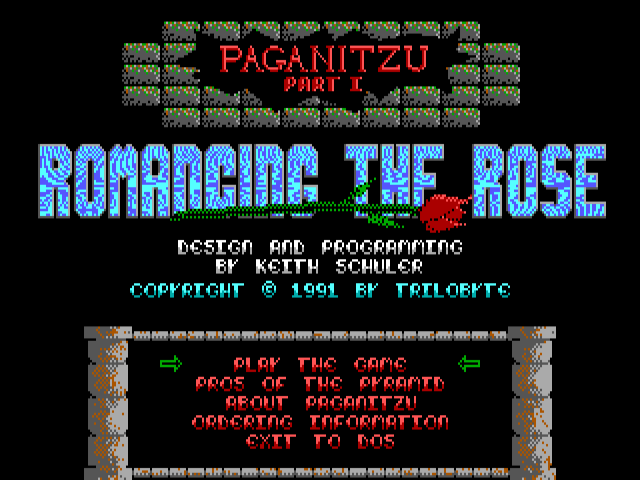
Paganitzu was a game for “IBM Compatible” computers that came out in 1991 by Apogee Software. It’s a puzzle game where your goal each level is to get all the keys to unlock the exit and escape without getting killed. You play Alabama Smith and you have to push boulders, block spitting snakes, avoid spiders, and much more to solve each level.
I have fond memories from the ’90s of playing this game, so I decided to reverse engineer it to learn what makes it tick. Some research at the University of Google revealed that it was originally written in QuickBasic (a Microsoft version of the BASIC programming language). This surprised me as I didn’t realize any “professional” games were written in BASIC. It also meant that trying to retrieve its source  code from its executables was not going to be feasible.
Data Files
So, I turned to its data files to see if I could glean any information from them. There are 16 files, named PAGA1.### where ### is 001 through 016. From this wiki, I found out roughly what each file contains.
paga1.001    Executable - Main menu & Cutscenes
paga1.002    Executable - Actual game
paga1.003    Fonts
paga1.004    PCX Library
paga1.005    In-game messages
paga1.006    PCX Library
paga1.007    Game levels
paga1.008    Paganitzu Graphics - Event Graphics (CGA)
paga1.009    PCX Library
paga1.010    Paganitzu Graphics - Menu Graphics (EGA)
paga1.011    Paganitzu Graphics - Menu Graphics (CGA)
paga1.012    Paganitzu Graphics - Tile & Sprite Graphics (EGA)
paga1.013    Paganitzu Graphics - Tile & Sprite Graphics (CGA)
paga1.014    Paganitzu Graphics - Digit Graphics (EGA)
paga1.015    Paganitzu Graphics - Digit Graphics (CGA)
paga1.016    Paganitzu Graphics - Event Graphics (EGA)
The first two, 001 and 002, are DOS Executable files, probably just renamed from .EXE to .###. Renaming them to .EXE and running them proves this to be the case. The main executable, PAGA1.EXE, asks the user a few questions (Sound on/off, etc.), runs PAGA1.001 for the main menu, and quits. Running the renamed PAGA-001.EXE sure enough jumps straight to the main menu. There are several options on the menu, like getting information on how to buy the entire series (the first game was free “shareware”, you had to pay to get the next two games; a common sales model back then). If  you select the option to start the game, it runs PAGA1.002 and quits. Running the renamed PAGA-002.EXE starts the game directly. Nice to know, in the future I could just run that instead of the main executable to get into the game quicker.
Next up is PAGA1.003 which contains fonts. The site didn’t have any information on those. I’ll have to figure out what format the data is in these myself.
Next up is a “PCX Library”. That took some more digging around at Google-U. Turns out a “PCX Library” was a common way of storing multiple files inside a single file. It looks like originally, it was designed to store PCX files (an image file popular at the time, like .JPG or .PNG today), but could be used to store any type of files. I’ll have to dig deeper into these to see what they contain.
Then we have “In-game messages” and “Game levels”. No information about them on the site. I’ll have to dig into them to see if I can figure out what format that data is in them.
That leaves “Paganitzu Graphics” files. These seem to be the result of the QBASIC “BSAVE” command that could save a block of data to a file. Some poking around in them reveals they contain 16×16 pixel “tiles” or “sprites” used in the game.
Conclusion
Wow, that was a lot learned already just from the data files. Still have a lot of work figuring out these various formats, some of which are fairly well documented online (like PCX Library files), some I can’t find anything about (like Fonts and Game levels). I’ll make new posts as I figure these out. For each file type, as I learn the format, I usually write small programs that read the data in the files and output information about them (such as drawing the tiles/sprites on the screen) as confirmation that I really do understand the format of the data in the files.
While it’s not feasible for me to pick the executables apart, I’m hoping I can learn enough about the game just from its data files that I could write a new modern engine for it that would run on modern computers. The original game requires a DOS “emulator” or similar to run today (or original 1990’s computer hardware). Modern Windows computers no longer support running the old DOS games. My “Paganitzu engine” would read the data files from the original game (you’d need the original game for it to work) and let you play Paganitzu. In theory, this could be ported to other platforms, like Linux or TRS-80 Color Computers, etc.
That’s it for now. This post has already gotten longer than I originally intended. I’ll make more posts as I crack the mysteries of Paganitzu’s data files. 😀


 Lee's Mind